
What Affects Website Page Speed?
While it’s easy to get caught up in technical performance specs, website page speed is more than a technical issue. It’s important on a holistic level because it affects everything from a visitor’s first impression of the site to its performance in search engine rankings.
Several factors can influence website page speed, thus impacting both user experience and search engine performance.
Videos & Non-Compressed Images
Media files, especially videos and images, can hurt page speed if they aren’t handled well. Two techniques, compression and streaming, when used correctly, can help improve page load speed. Compression reduces file sizes by sacrificing quality, while streaming allows videos to load in smaller chunks.
There is an inherent philosophical conflict between how photographers, videographers, and graphic designers approach media and how website developers handle media files. Creators focus on making work look as good as possible, which often means using high-quality formatting that takes a long time to load. Website developers have to balance visual quality with file size, which often requires trial and error to find the right compression level. Depending on the website’s setup, videos and images can be compressed and adjusted through the Content Management System, Digital Asset Management System, or media server when building pages. However, some implementations require formatting media files before using them.
Special & Custom Fonts
Fonts are an often invisible contributor to page load times. If your device has a font installed, it will use those font files. If it does not, it must download the font file from the site, which increases load time and may cause the font style on a page to change as soon as it finishes loading.
Custom fonts can quickly become a significant problem for load speed if they aren’t web-optimized and the page uses several of them. This performance problem can be invisible within a business because the computers your staff uses to develop the site likely have those fonts installed and won’t experience the extra load time they add.
A web-optimized font has a reasonable file size between 15 and 40KB, but custom fonts intended for use in PDFs and image assets can grow to 250KB to 5MB, which adds a considerable data footprint to the first page load on your site. An optimized site uses web-safe standard fonts or web-optimized custom fonts, removing special fonts that are incompatible with fast load times.
Bad CSS Structure & Bloated Page Templates
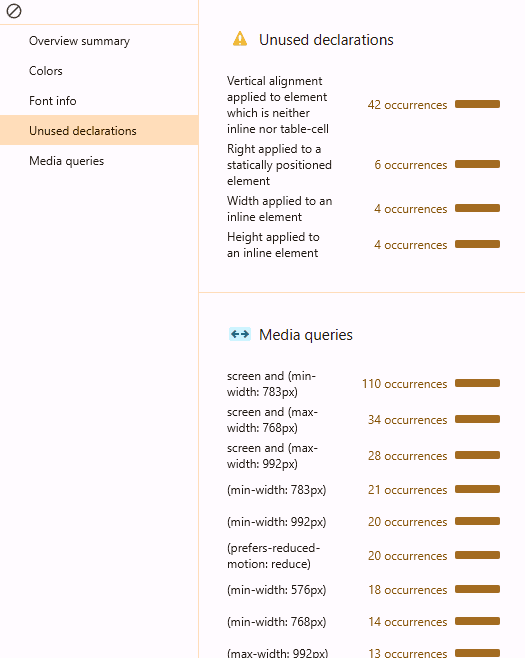
Inefficient code, especially when it isn’t doing anything on the page, can be detrimental to website page speed. Page templates feature reusable content shared across pages, but they can accumulate unused features and inefficient code as developers add new ones. Depending on how often you update them, templates need to be periodically refactored to keep them efficient and remove excess code.
Cascading Style Sheets, or CSS, are part of a website’s code that control how it looks. This code is designed to be reusable across multiple pages, making it easy to maintain a consistent design site-wide and reducing the effort required to create page content. However, there are persistent, outdated practices in CSS that actually harm website load speed rather than improve it.
In the early days of the Internet, it was a given that most users had slow connections, and a first page load that took less than 20 seconds was a good thing. The idea was to leverage caching, or storing content on the local device, so that subsequent page loads would go much faster. However, CSS had a much smaller feature capability set at the time, and these files were still very small, so it made sense to fit all CSS into three files to use across your site. This practice backfired as sites became more sophisticated and these files grew larger. It’s not so much the size of the CSS files that’s an issue on a modern device, but the browser having to parse through all that information on a page that uses only 5 to 10% of it.
While current devices are lightning-fast compared to devices from decades ago, processing all that unnecessary data has a cumulative effect on page load speed and can make the difference between a breezy 2.5-second load time and a slightly problematic 3+ second load time. CSS needs to be structured so that pages reference only the CSS that matters.
Unused JavaScript
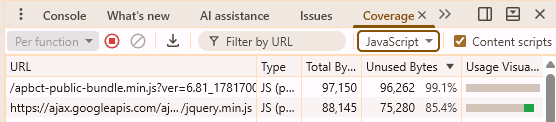
JavaScript, the programming language that essentially runs the web, can slow down page load times if a site loads it unnecessarily. As with CSS, it’s easy to fall into the trap of loading JavaScript on every page, even when it’s not needed. Unused JavaScript creates two problems that hurt load times: 1) the device has to load the file, which may be large, and 2) the browser needs to process it if it is called, which also takes time. Sometimes, you don’t know whether a function will run on a page, so developers load the file to be safe. But, if left unchecked, this practice can cause every JavaScript file to load on every page.
Server
As site traffic increases, a website needs more server resources to handle requests quickly; if the server is overwhelmed, pages will load more slowly. Therefore, it’s important to have a hosting setup that can scale to meet demand. Additionally, a Content Delivery Network (CDN) is a great option to improve page load times. A CDN is a geographically distributed group of servers that store content closer to users, reducing the number of steps a data request must pass through to reach a visitor’s device. CDNs are also a great tool for businesses that operate across wide geographic regions, because without a CDN, a user on the East Coast may have lightning-fast load times, but a user on the West Coast may experience sluggish load times.
Third-Party Integrations & Plugins
Third-party integrations and plugins are great options for expanding your website’s functionality and gathering important information to improve your site. However, they may not prioritize fast load times, and the more a site uses, the longer it will take to load, unless plugins are designed to improve load times. If your page performance is poor, removing some is an easy way to reclaim precious load time. However, there’s no one-size-fits-all solution to handling third-party integrations and plugins. The best thing your business can do is analyze how much each integration and plugin adds to your site load times and determine whether that extra time is worth the added functionality.
No Caching
Caching, or storing data in a location for later reuse, improves page load times for visitors. Leveraging caching is an incredibly complex practice that spans delivery mechanisms, servers, and devices. The goal of caching is to store data that can be reused as close to the user as possible for an appropriate duration, and it’s something you’ll want to address with both SEO and performance experts.
Testing & Fixing Page Speed

Page speed measurement tools, like PageSpeed Insights and Google Chrome’s built-in Lighthouse, provide excellent quantitative data that breaks down how quickly a website page loads. Instead of chasing the maximum point score across the various contributing factors to load times, focus on lower scores to identify where your site can improve most.
The 2.5-Second Rule
One of the benchmarks, Largest Contentful Paint, is the number that matters most in the grand scheme of things. Because websites continue to load new content throughout the experience, we want to look at how long it takes the main page content to load, so the visitor can start interacting with your site.
The goal isn’t to get the Largest Contentful Paint event as close to zero seconds as possible, but rather to target 2.5 seconds. The widely cited 2.5-second rule comes from data examining the relationship between a site’s load time and whether visitors are willing to wait before leaving. Bounce Rate, or the percentage of users who viewed a single page on a site and left, plays an important role in SEO. The longer a web page takes to load, the more likely a site visitor is to get frustrated, give up waiting, and leave. Sites that take longer than 3 seconds to load have a 40% higher abandonment rate than sites that load faster than 3 seconds, and the abandonment rate only gets worse from there, with 5-second-plus load times getting 90% bounce rates.
How Largest Contentful Paint Impacts SEO
A site that loads a third of a second faster than another is indistinguishable (for the most part) concerning the user experience relative to the quality of the site’s content. Search engines don’t want to be in a situation where lower-quality content ranks higher than high-quality content simply because a page loads a fraction of a second faster. However, when two pages have similar content quality, one loads in 3 seconds and the other in 9 seconds, the faster site offers a much better experience. Search engines also take Site Visit Duration into consideration for SEO rankings. Some users may put up with the first page or two taking a long time to load, but they’ll give up waiting on a site with long load times, resulting in a lower visit time.
The best way to handle it is not to aim for a perfect score in page performance tools by making everything as optimal as possible, but to identify and address issues that degrade your site’s experience. Having a technical SEO expert work with you is important for making sense of the various metrics that affect page load speeds, identifying which parts to focus on to improve performance, and implementing those changes. Some of these fixes may include removing unused code, compressing large image files, removing unnecessary plugins, and more.
Keep Your Website Optimized
Founded in 2010, Momentum is a digital marketing partner specializing in helping businesses grow through SEO, PPC, and website design.
If you are looking to increase your site’s reach and attract more customers, reach out to us for a free website review/assessment. During this free review, we’ll show you what is currently affecting your website and how we can help you fix it. Get started today!
