Suspended GBP? Follow This Guide Before Starting Your Appeal
Seeing your Google Business Profile (GBP) suspended can feel like the rug has been pulled out from under your business. Leads slow down, calls stop coming in, and you’re left wondering what went wrong and what to do next. Before you rush to file an appeal, it’s critical to understand the type of suspension you’re dealing with and how to fix it properly. This guide walks you through exactly what to do if your GBP is suspended and how to fix a suspended GBP without making mistakes that could delay or permanently block reinstatement.
Hard Suspension Versus Soft Suspension: What’s the Difference?

Not all suspensions are the same. A soft suspension means your profile is still visible in Google Search, but your dashboard says it’s unverified. You can usually still log in and edit information. A hard suspension removes the profile entirely from public view and often limits what you can change in the backend.
Hard suspensions are (usually) triggered by more serious guideline violations, such as address issues or business name manipulation, while soft suspensions are tied to inconsistencies or recent edits that raised red flags. Knowing which one you’re dealing with helps determine how cautious you need to be before starting the appeal process.

Ensure NAP Information Matches Across All Accounts
One of the most common reasons for suspension is inconsistent Name, Address, and Phone number (NAP) information. You need to verify that the business name, physical address, and phone number listed on your Google Business Profile match exactly what appears on:
- Your website
- Social media profiles
- Business directories you manage (most people forget about this!)
Even small differences, like “St.” versus “Street,” or adding keywords to your business name on GBP but not your website, can trigger a suspension. Before submitting an appeal, audit every platform you control and ensure your NAP is identical across all of them.
Don’t Make a New GBP
When panic sets in, some business owners try to create a brand-new Google Business Profile, verify it, and then delete the suspended one. While it sounds like a good idea, it’s not. This approach does not work.
Google tracks businesses using multiple data points, not just the email address. Creating a duplicate profile while another is suspended often results in additional suspensions and can permanently damage your ability to get reinstated. If your GBP is suspended, your only legitimate path forward is to fix the issues and appeal the original profile.
Hide Your Address (Service-Area Business Only)
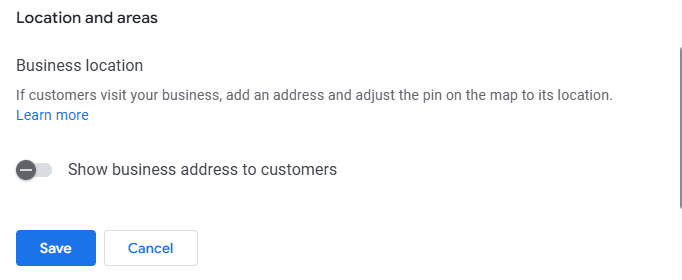
If you’re a service-area business, such as an HVAC company, plumber, or landscaper, you must hide your physical address unless customers actually visit you at that location during stated business hours.
If you don’t serve customers at your address and that address is visible on your profile, that alone can cause a suspension. You’re still allowed to have a GBP, but you need to:
- Remove the visible address
- Set defined service areas instead
Please note that you still need to provide proof of address during the verification process. You should hide the address once the profile has been verified.
Get Documentation Ready
Once you start the appeals process, Google only gives you one hour to submit all evidence.
You must be able to prove that your business is real and operates at the listed location, so you’ll need to provide:
- Photos of your office or storefront with permanent, clear signage
- A utility bill showing the same address as your GBP
- A tax form or business license with matching business details
P.O. boxes do not qualify, nor do co-working spaces. If you do not have a real physical location with permanent signage, you are not eligible for a Google Business Profile. If you don’t have signage or valid documentation, your profile will not be reinstated, no matter how many appeals you submit.
Check Posts
Before appealing, review every post on your profile. Remove anything that could be considered spammy or misleading, including:
- Promotional posts that make unrealistic claims
- Repetitive keyword-stuffed content
- Posts advertising services that violate Google’s policies
Even a single problematic post can keep your profile suspended. Cleaning this up beforehand strengthens your appeal and shows good-faith compliance.
Tips for Avoiding Suspensions in the Future
Once your profile is reinstated, the goal is to keep it that way. Follow these best practices to reduce the risk of future suspensions:
- Don’t create multiple GBPs for different service areas unless you have a physical office at each location.
- If you’re rebranding, update your website first. Wait until Google has indexed the new name before touching your GBP.
- Make changes slowly over several days. Start with your NAP, then other categories if needed.
- Ensure all GBP updates are reflected on social media and directory listings. If you use Local Service Ads (LSAs), update those as well.
- Know what you can and cannot advertise on Google.
- Never post fake reviews or improperly incentivize customers. If Google sees an uptick in reviews, you’ll get a ‘suspicious activity’ badge (known as the badge of shame in the SEO community) on your profile. In worst-case scenarios, Google will remove your ability to receive new reviews and respond to existing ones.
What to Do If You Don’t Hear Back From Support
Google support can be slow. It’s not unusual to wait days or even weeks for a response, and you may end up speaking with multiple support representatives on the same ticket. If your appeal is rejected or you receive no response, you still have options.
There is an official Google Business Profile community forum where Product Experts can review your case and provide guidance. In many situations, this is the fastest way to move forward when standard support channels aren’t helping.
Get Help Managing Your Google Business Profile
If managing your GBP feels overwhelming, or if you’ve dealt with repeated suspensions, it may be time to get professional help. Momentum works with service-area businesses to improve visibility, stay compliant with Google’s guidelines, and avoid costly mistakes. Our SEO plans include Google Business Profile management to help protect your listing and maximize local search performance.
If you want expert support and a long-term strategy, schedule a consultation today.
